
Microsoft Partner

Power BI Consulting

Metric-X is a Microsoft Partner offering Power BI report development and guidance for companies seeking data-driven insights.

Microsoft Partner for Power BI

Metric-X is a Microsoft Partner offering Power BI report development and guidance for companies seeking data-driven insights. We help you leverage the full Microsoft ecosystem — from Excel to Azure to Power BI.

Explore our frequently asked questions below to learn more about Power BI and how Metric-X can help your organization.

Power BI

Technical Architecture

Metric-X builds end-to-end analytics solutions. We connect your business systems, centralize the data, and deliver interactive Power BI dashboards your team can access from any device.

Metric-X Data Architecture — Sources to Reporting Database to Power BI
1
Sources
Excel, Salesforce, QuickBooks, APIs
2
Data Pull
Automated ETL pipelines
3
Store
Reporting Database / Azure
4
Data Push
Scheduled refresh via Gateway
5
Presentation
Power BI dashboards

The Power BI Ecosystem

Power BI is part of the Microsoft ecosystem. Here's how the components work together to deliver enterprise analytics.

D

Power BI Desktop

Free authoring tool. Build data models, create DAX measures, design interactive reports. Connects to 100+ data sources.

S

Power BI Service

Cloud platform (app.powerbi.com) for publishing, sharing, and collaborating on reports. Integrates with Teams, SharePoint, and Office 365.

G

Power BI Gateway

Bridge between on-premises data and the cloud. Enables scheduled refresh so dashboards always show the latest numbers.

M

Power BI Mobile

Native iOS and Android app. Access dashboards on the go with touch-optimized layouts and push notifications for data alerts.

Sample Dashboard

Here's an example of a Power BI occupancy dashboard built by Metric-X for property management analytics.
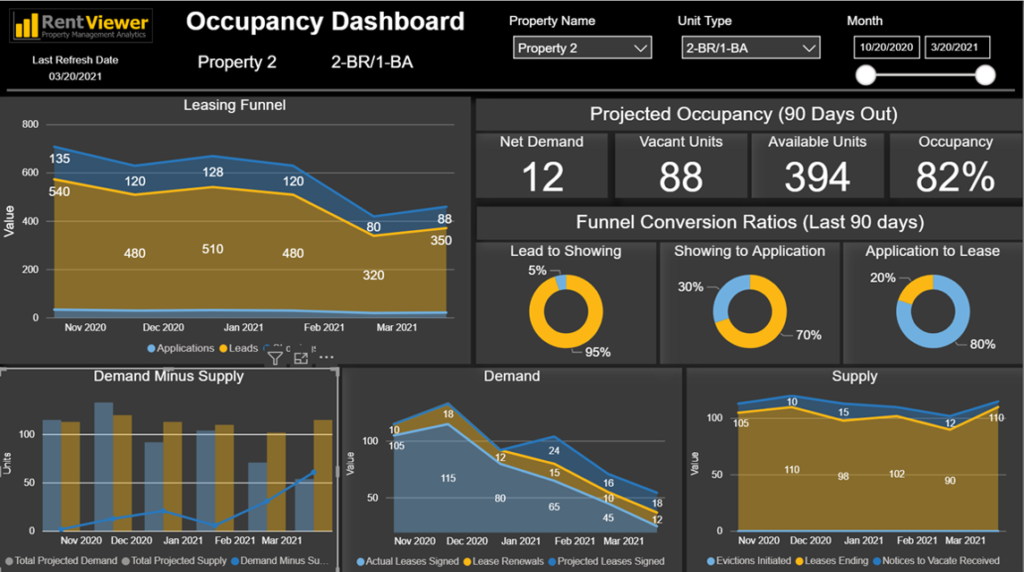
Power BI Occupancy Dashboard by Metric-X

Occupancy Dashboard — Leasing funnel, projected occupancy, demand vs. supply analysis

Never Heard of Power BI

What is Power BI?
Power BI is a Microsoft tool enabling companies to create and share reports among coworkers with drill-down capabilities for pattern analysis.
Can Power BI and Excel co-exist?
Yes. Power BI extends Excel's reporting capabilities while Excel remains a powerful business application for data entry and formulas.
What are some things that Power BI can do that Excel cannot?
Power BI improves charting simplicity, repeatability, and sharing capabilities. Reports update automatically when connected to live data sources.
What is Power BI Desktop and the Power BI Service?
Desktop is free software for creating reports. Service is the cloud platform for publishing and sharing reports (requires subscription).

Considering Power BI

We create reports in Excel. Why would I need Power BI?
Power BI enables rich, interactive dashboards that update automatically and can be shared across teams via the cloud — no more emailing spreadsheets.
What skills are necessary to use Power BI?
Excel proficiency is the best starting point. If you understand pivot tables, formulas, and data relationships, Power BI will feel familiar.
I am already an Excel power user. How long will it take me to learn Power BI?
You can create your first report within an hour. Power BI Desktop is free to download and practice with. Advanced DAX formulas take more time to master.
How is Power BI different from Tableau?
Power BI integrates deeply with Microsoft products (Excel, Azure, SharePoint). Tableau offers more advanced visualization. Both produce excellent analytics — your existing tech stack often determines the best fit.
Which do you recommend, Power BI or Tableau?
Metric-X is partner to both. If your company runs Microsoft 365, Power BI integrates seamlessly. For organizations prioritizing visual storytelling, Tableau may be the better choice.
What do you mean by Total Cost of Ownership?
Beyond license fees, true costs include labor (development, data prep, support), additional software subscriptions, and infrastructure (databases, networking) required for analytics implementation.
What are the negatives of Power BI?
Power BI's free Desktop version is powerful, but sharing requires paid Pro or Premium licenses. Complex data models can become slow. The DAX formula language has a steeper learning curve than Excel formulas.
We do all our data analysis in Excel. Why would we want Power BI?
Power BI handles larger datasets, provides automatic refresh from live data sources, and offers interactive dashboards your entire team can access from any browser or mobile device.

Need Power BI Help

I need an experienced Power BI consultant, how can Metric-X help?
Metric-X provides experienced Power BI developers who can build reports, set up your data model, configure the Power BI Service, and train your team — on-site or remotely.
We already own Power BI. We need someone to organize our data for analysis. Can Metric-X help?
Yes. Data organization is one of our core strengths. We can build a data warehouse, create ETL pipelines, and connect everything to Power BI for automated reporting.
Power BI

Official Partner

Book an Appointment

Ready to discuss Power BI for your organization?

Schedule Meeting
Send a Message
Talk to an Expert

Ready to speak with us?

Contact Saad Shah, founder of Metric-X. Whether you're just exploring or ready to start a project, we're here to help.

Saad Shah
Saad Shah
Founder & CEO
Book Demo

Ready to Unlock the Power of Your Data?

Let Metric-X guide your Power BI implementation from start to finish.

Book a Free Consultation